Exaro Unreal: put Claude, Codex or Cursor inside Unreal Engine over MCP
Exaro Unreal is an Unreal Engine plugin and MCP server that lets the AI you already pay for build levels, write Blueprints and C++, test in Play and package the game, with every change waiting for your approval.
If you've tried to use an AI assistant on an Unreal project, you know the gap: it can write a Blueprint explanation or a C++ snippet, but it can't see your level, can't click anything, and can't check whether what it suggested actually works. You end up as the go-between, copying, pasting and describing screenshots.
Exaro Unreal closes that gap. It's an Unreal Engine plugin with an MCP server inside it, so the AI you already use can work directly in your open editor: look at the project, make changes, run Play-In-Editor, and read back what happened.
Your AI, your keys, no token meter
Exaro Unreal doesn't sell you an AI. Use your own Anthropic, Google or OpenAI key, or the Claude Code, Codex or Gemini CLI subscription you already pay for. Your key stays on your machine and goes only to the provider you pick. Exaro never meters or marks up AI usage.
You can chat from a panel inside Unreal (Ctrl+Alt+A) with nothing to configure, or drive the open editor from Claude Code, Cursor, Claude Desktop or your own agent over MCP. The MCP guide shows the one-line setup for each client.
What it can do
- Block out and dress a level: place and arrange actors, build room shells and staircases, sculpt and paint landscapes, drive PCG graphs.
- Write the logic: Blueprint graphs, functions, components and event dispatchers, or C++ classes compiled and hot-loaded with Live Coding, with the errors read back.
- Make it move: playable characters and enemies, Blend Spaces, Chooser Tables, Motion Warping and combat montages.
- Make it a game: Gameplay Ability System, Behavior Trees, State Trees, EQS, navigation, dialogue, interaction and replication.
- Make it look right: PBR materials and full material graphs, Niagara systems, rendering settings.
- Film it and frame it: Level Sequences, camera rigs, HUDs, menus and settings screens.
- Prove it works: run Play-In-Editor, read live values off running actors, test hit reactions and triage crashes.
- Get it out the door: audit assets and triangle budgets, generate LODs, fix redirectors, then cook and package.
Nothing changes without your OK
Your AI can look at the whole project freely. Every change it wants to make appears as a card showing exactly what will happen, and waits for you to click Approve. Each approved change is a single undo step.
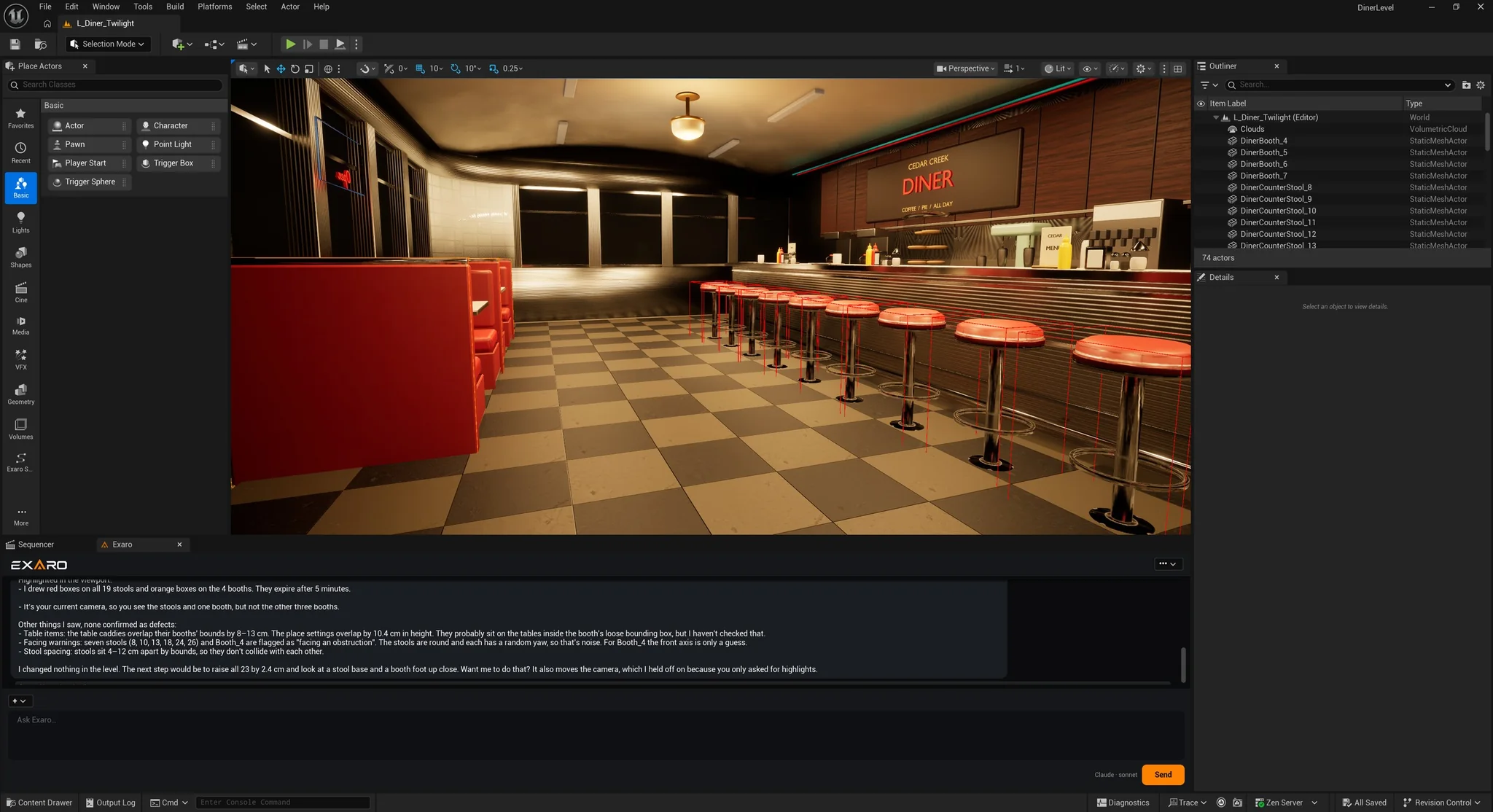
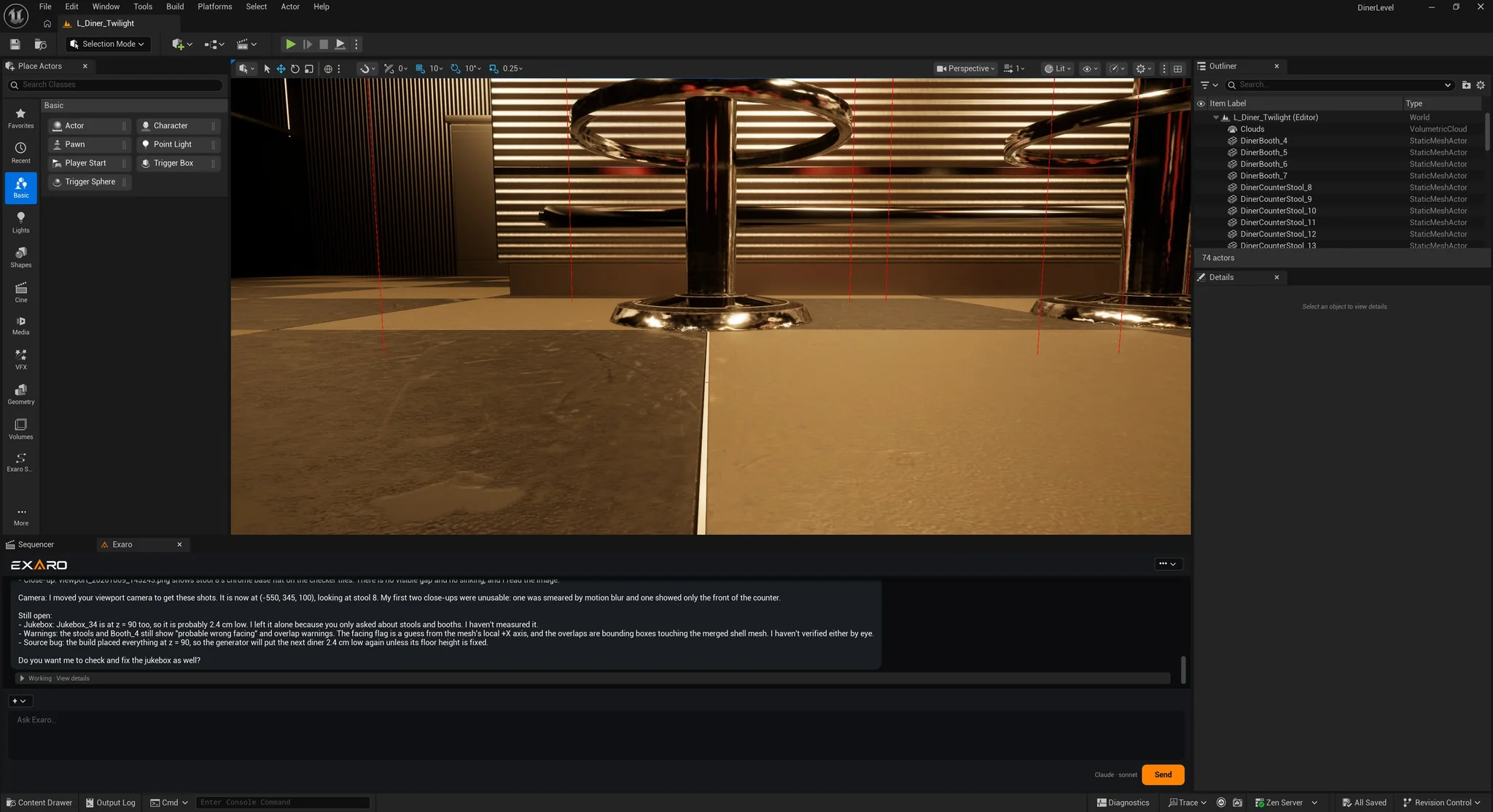
In one real session, on our Cedar Creek Diner level, it found all 19 counter stools and 4 booths sitting 2.4 cm into the floor, listed what it couldn't confirm, and reported "I changed nothing in the level." Once approved, it raised them, moved the camera to a stool base to check, and listed what was still open.
Runs on your machine
The MCP server lives inside your open editor and listens only on your own computer. Your license is checked once, then verified locally, so Exaro keeps working offline.
Works with the rest of Exaro
Exaro Unreal can shop Exaro Assets for you: ask for a prop, see the price, approve the purchase, and it lands in your project. And with Exaro Model, your AI can build a new model in Blender and send it straight into the open editor.
Pricing
Free is the trial: no card and no time limit, with every read-only tool for full project inspection. Changing the project needs a license: Individual is $299.99 once for one person on two machines, and Studio is $999.99 once for companies and teams. See pricing, or start with the Getting Started guide.