Working Cash Register
An electronic cash register that works like the real thing: every key presses, the displays show what is keyed, the receipt prints what was sold, and the drawer, note clips, printer lid, customer display and mode key all move. One Blueprint, subscribable events, and a cashier game you can play the moment it is installed. For Unreal Engine 5.5, 5.6, 5.7 and 5.8.
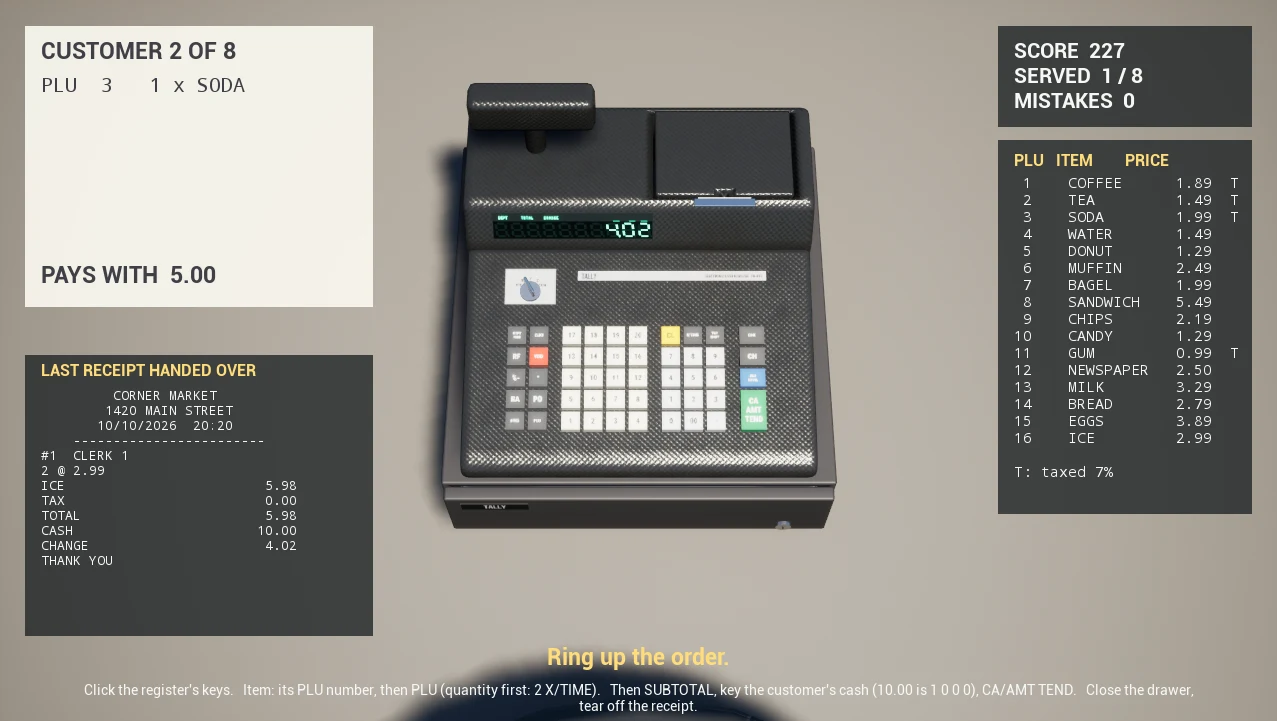
L_CashRegister_TopDown and press Play. To use the register in your own level, drag BP_CashRegister onto a counter, set your store's name in its Details panel, and have your interaction send Interact with the bone the player clicked. Everything below is detail.Get it on the Exaro store or on Fab (search Working Cash Register).
1. Install
From Fab:
- In the Epic Games Launcher, open Fab Library, find Working Cash Register and click Add to Project.
- Pick your project and engine version (5.5 to 5.8). The pack lands in
Content/CashRegister.
From the Exaro store: the download holds the FBX and GLB files and an Unreal folder with one zip per engine version (CashRegister_UE5.5.zip to CashRegister_UE5.8.zip).
- Unzip the one for your engine. It is a small project,
CashRegister.uproject: open it to try the demos first. - To add the register to your own game, close your editor and copy the project's
Content/CashRegisterfolder into your project'sContentfolder, then open your project again.
The FBX (a skeletal mesh and one FBX per clip) and GLB (every clip embedded) work in any engine: the 68 animations and the designed collision are there, the register's logic is the Unreal Blueprint.
The pack is Blueprints and content only: no plugin, no C++, no project settings to change. The demo maps set their own game mode and the demo input adds its own mapping, so nothing in your project is touched.
2. Play the demos
| Map | What it shows |
|---|---|
Maps/L_CashRegister_TopDown | The cashier game: a camera over the counter, mouse clicks on the keys, customers with orders, scoring. Built on the register's events (section 6). |
Maps/L_CashRegister_Showcase | Walk up to the register on a counter in first person (WASD and mouse) and click anything: keys, drawer, note clips, printer lid, customer display, receipt, mode key. |
Maps/L_CashRegister_Overview | The Blueprint, and every one of the mesh's 68 animation clips playing side by side. |
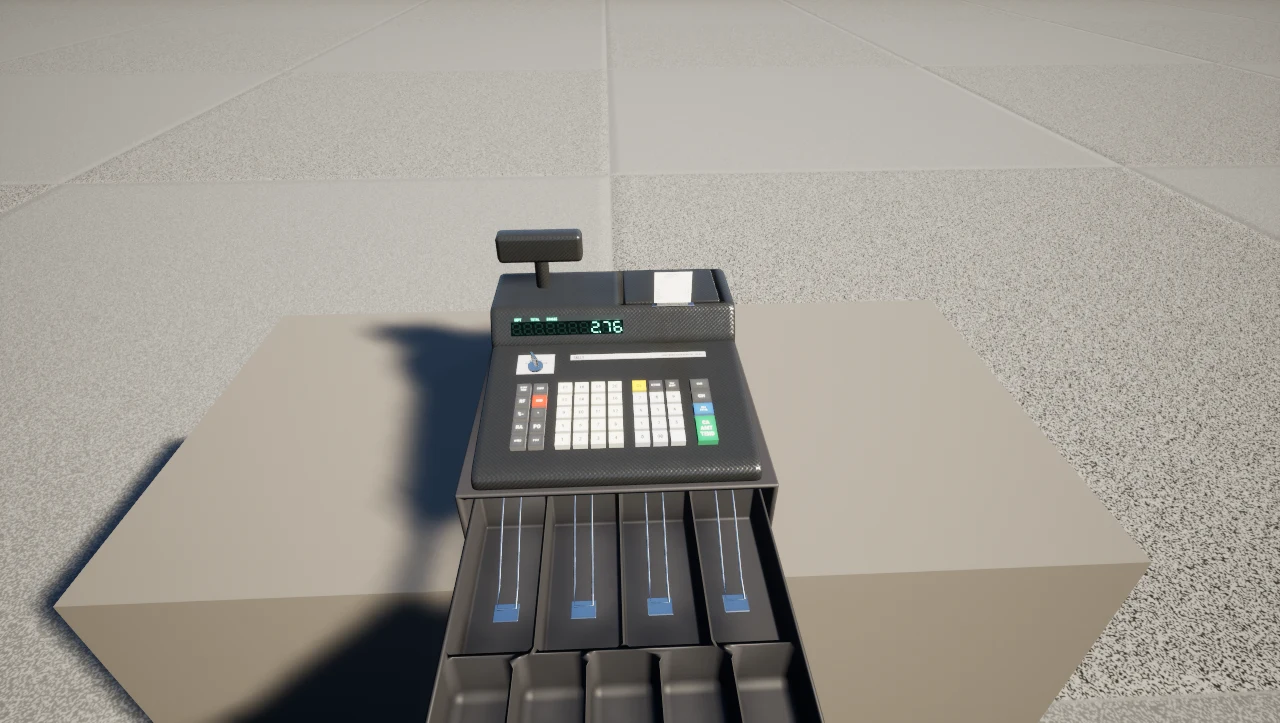
Playing the cashier game
- Read the customer's ticket (top left). Each line is a preset item: PLU 6, 2 x MUFFIN.
- For a quantity, key it and press X/TIME: 2 X/TIME.
- Key the PLU number and press PLU: 6 PLU. Repeat for every line.
- Press SUBTOTAL to see what is due with tax.
- Key the customer's cash in cents and press CA/AMT TEND: a ten is 1 0 0 0 CA/AMT TEND. The display shows the change and the drawer springs open.
- Click the drawer to push it shut and click the receipt to tear it off. The next customer steps up.
A sale scores 100 for the right total, 50 for tendering the right amount, and a point for every second under 90.
3. Put it in your level
- Drag
Blueprints/BP_CashRegisterfrom the Content Browser onto a counter. It stands on its rubber feet at the actor's origin. - With it selected, open the Cash Register sections of the Details panel and set it up for your store (below).
- Place as many as you like: each register keeps its own sale, totals, receipt and settings.
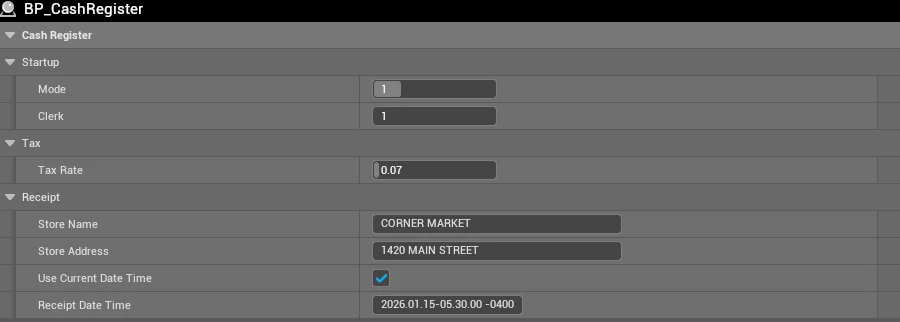
| Setting | What it does |
|---|---|
| Store Name, Store Address | Printed, centred, at the top of every receipt. |
| Use Current Date Time | On (the default): receipts print the date and time of the player's clock. Off: they print Receipt Date Time, for a scene set at a fixed moment (a crime scene, a flashback). |
| Receipt Date Time | The date and time printed when the clock is not used. |
| Tax Rate | Sales tax on taxed items: 0.07 is 7%. Departments 1 to 10 are taxed, 11 to 20 are not; each preset item says whether it is taxed; TAX SHIFT flips the next item. |
| Plu Items | The preset items the PLU key rings up, PLU 1 first: a name (the receipt prints 10 characters), a price in cents and whether it is taxed. Add, remove or reprice rows freely. |
| Mode | Where the mode key starts: 0 OFF, 1 REG, 2 X, 3 Z, 4 PGM. A register left OFF is dark until someone turns the key. |
| Clerk | The clerk number printed on every receipt. |
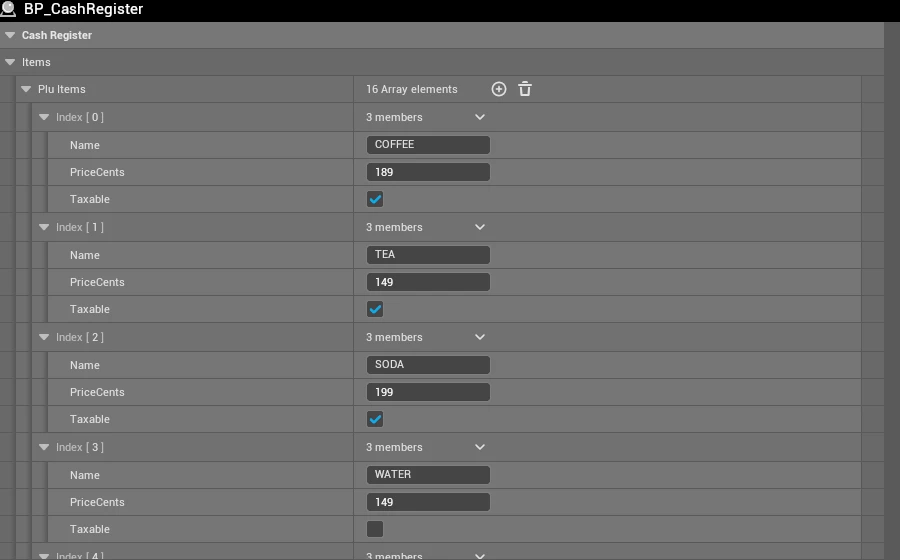
Receipt Date Time is entered and shown in your local time, and the receipt prints exactly what the Details panel shows.
4. Let your player use it
The register needs one thing from your game: when the player uses it, tell it which part they used. Every key and moving part is a bone of the register's mesh, and each has its own collision, so a line trace or a cursor hit already knows the bone. Pick whichever of these fits your game.
Send Interact (recommended)
BP_CashRegister implements BPI_Interactable. From your interaction code, send Interact to the actor you hit with the hit's bone. No cast and no reference to the register: other actors that do not implement the interface ignore the message.
Line Trace (or Get Hit Result Under Cursor by Channel, Visibility)
  -> Break Hit Result
  -> Interact (Message)   Target = Hit Actor   Bone Name = Hit Bone Name
Demo/Cashier/BP_CashierController does exactly this for a mouse game, and the first-person pawn in Demo/BP_ShowroomPawn does it for a camera trace. Copy either.
Or call it directly
- UseBone(BoneName): the same as Interact, when you already hold a reference to the register.
- PressKeyCode(Code): press a key by its code, as a player would. It moves and works. Good for NPC cashiers, tutorials and cutscenes:
PressKeyCode("1"),PressKeyCode("plu"),PressKeyCode("cash"). - OpenDrawer, CloseDrawer, SetMode(NewMode), Tear, Feed: the moving parts and the receipt, without a click.
- PrintRow(Row) and PrintLine(LeftText, RightText): print your own lines on the receipt (a loyalty message, a promotion).
| Bone | What using it does |
|---|---|
key_0 … key_9, key_00, key_dot | Key a figure. Amounts are keyed in cents: 1 9 9 is 1.99. After . the next two figures are dimes and cents. |
key_dept_1 … key_dept_20 | Ring the keyed amount up in that department (1 to 10 taxed). |
key_plu | Ring up the preset item whose number was keyed. |
key_times | X/TIME: the keyed number is the next item's quantity. With nothing keyed, the display shows the time. |
key_subtotal | Show what is due with tax. |
key_cash, key_check, key_charge | Tender. Cash and check take the keyed amount (exact with none) and give change; charge is always exact. |
key_clear, key_void, key_refund, key_tax_shift | CL clears the entry; VOID cancels the last item; RF makes the next item a refund; TAX SHIFT flips its tax. |
key_discount, key_minus | %- takes the keyed percent (10 with none) off the last item; - takes the keyed amount off (a coupon). |
key_no_sale, key_received, key_paid_out | #/NS opens the drawer for no sale; RA and PO put cash in and take it out. |
key_rcpt_feed, key_clerk | Feed the paper; set the clerk number. |
drawer | Push an open drawer shut (any lifted note clip drops first). |
note_clip_1 … note_clip_4 | Lift or lower a note clip, with the drawer out. The till ships empty: what goes in it is your game's. |
printer_lid_hinge, display_swivel | Open or close the printer lid; swing the customer display round. |
receipt_feed | Tear off the receipt. |
mode_key | Turn the mode key one position: OFF, REG, X, Z, PGM. |
5. How the register works
It follows a shop register's rules, so a player who has worked a till knows it already.
- REG rings up sales. X and Z print reports when CA/AMT TEND is pressed: X reads the day's totals (gross, cash, RA, PO, no-sale count), Z prints them and resets them. OFF and PGM ignore the keys; OFF turns the displays dark.
- The first item of a sale prints the receipt's head: the store's name and address, the date and time, the sale number and the clerk.
- Every item prints a line with its amount (T when taxed); a quantity prints a 3 @ 1.99 line above it. The tender prints tax, total, the amount tendered and the change.
- A tender short of the total shows the balance still due, so a sale can be split between cash, check and charge.
- Cash and check tenders spring the drawer open; it stays out until someone pushes it shut.
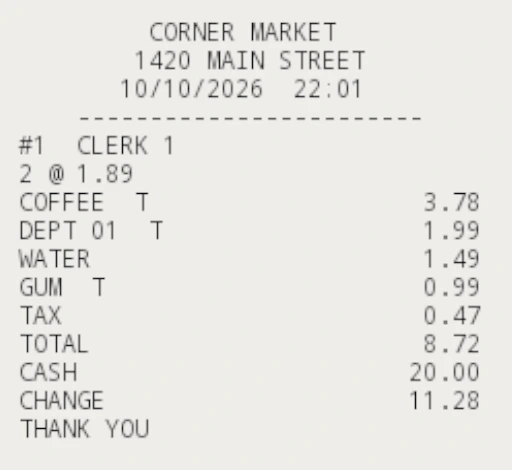
6. Listen to its events
Everything the register does is announced through event dispatchers, so your game reacts without polling. In any Blueprint, drag from a reference to the register and pick Bind Event to On…. The register does not need to know about your game.
| Event | When | With |
|---|---|---|
| OnKeyPressed | A key is pressed. | Key (its code: 7, dept_3, cash…) |
| OnDisplayChanged | The displays change. | AmountCents, LeftNumber (−1 when blank) |
| OnSaleStarted | The first item of a sale is rung up. | SaleNumber |
| OnItemAdded | An item is rung up. Discounts, coupons and voids come through negative. | Label, AmountCents, Taxable |
| OnLinePrinted | A line prints on the receipt. | Line, exactly as printed (32 columns) |
| OnSaleCompleted | A sale is paid. | TotalCents, TenderedCents, ChangeCents, Tender (CASH, CHECK, CHARGE) |
| OnDrawerOpened, OnDrawerClosed | The drawer springs open or is pushed shut. | |
| OnReceiptTorn | The receipt is torn off. | ReceiptText: the whole receipt as text, 32 columns, one line per row |
| OnModeChanged | The mode key turns. | Mode (0 to 4), ModeName |

OnReceiptTorn hands over the receipt exactly as printed, so a game can put it in the player's inventory, show it in the UI, or check it against an order. The cashier game shows the last one in its HUD.
7. Reading its state
The sale is readable at any time from the register's variables (Cash Register → State). Amounts are whole cents.
| Variable | What it holds |
|---|---|
| Entry, Qty | What has been keyed so far, and the quantity for the next item. |
| SaleTotal, TaxDue, TotalDue, Paid | The sale before tax, its tax, its total, and what has been tendered. |
| Items, InSale | Lines rung up, and whether a sale is open. |
| DrawerOpen, ClipsUp | The drawer, and which note clips are lifted (a bit each: clip 1 is 1, clip 4 is 8). |
| ReceiptText, Lines | The receipt so far as text, and its line count. |
| SaleNo, Gross, CashTotal, RaTotal, PoTotal, NoSales | The day's books, as the X report prints them. A Z report resets them. |
Helpers: LookupPlu(Code) returns a preset item's name, price and tax status (the cashier game builds its orders and its PLU sheet with it), and Money(Cents) formats an amount the way the register prints it.
8. What is in the pack
| Asset | What it is |
|---|---|
Blueprints/BP_CashRegister | The register. Its graphs are commented: BeginPlay, UseBone, and one function per key. |
Blueprints/BPI_Interactable | The Interact(BoneName) interface. Implement it on your own usable props and one interaction serves them all. |
Blueprints/S_RegisterItem | A preset item: Name, PriceCents, Taxable. |
Meshes/SK_CashRegister | The skeletal mesh with its physics asset: per-part collision, so traces find the bone. |
Animations/ABP_CashRegister_Parts | Every key and moving part on its own animation layer, so any number move at once. |
Materials/M_SegmentDisplay | The fluorescent seven-segment displays, drawn by the material from the amount it is given. |
Demo/Cashier | The cashier game: controller, HUD and game mode. |
Demo | The first-person showroom pawn, its HUD and input. |
9. Performance
The register is built to be placed many times in a store level.
- One skeletal mesh of 5,626 triangles with 59 bones. Its printed key legends, labels and display windows are textures, not geometry.
- One 2048 texture set for the body.
- No Tick in the Blueprint. The register only does work when it is used: a key press, a Timeline while a part moves, a line of text on the receipt.
- The mesh animates only while it is on screen, and less often when it is far away (update rate optimisation), so a store full of registers costs little.
- The displays are a material with two parameters, not text actors or render targets.
- Collision is 380 boxes over 59 bones, fitted to the parts, so traces and physics stay cheap.
Troubleshooting
Clicking the register does nothing
Your trace must use a channel the mesh blocks (Visibility, the default) and send the Hit Bone Name, not the component's name. Check the mode key: OFF (dark displays) and PGM ignore the keys. Turn it to REG.
The receipt shows the wrong date
Tick Use Current Date Time on the placed register, or set Receipt Date Time to the moment your scene is set.
The drawer will not open for a sale
Charge tenders never open it; cash and check do. A tender short of the total leaves the sale open and shows the balance. Key the rest and tender again.
PLU rings up nothing
The keyed number has no row in Plu Items. PLU 1 is the first row.
Need help?
Email [email protected] with your engine version and a screenshot.